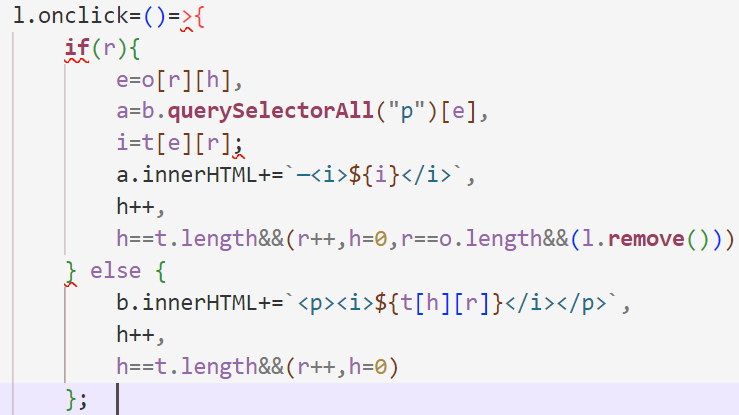
What's in my bag
- Katherine Yang
Out of the list of ideas, I chose Katherine Yang's What's in my bag because it's the website starts as a simple list, but as you continuously press the bottom button, it keeps adding sentences to each item.
In terms of the HTML and CSS, it has the most simplistic code. The majority of the interactivity relied heavly on javascript. The design ressembles a list that you would make on your notes.
HTML INTERACTION:
On a first glance, you can tell that the javascript code interacts with HTML elements using selectors like querySelector and it dynamically modifies the content of these elements based on the randomized order of descriptions
Initialization
Between the script tags, an array is created containing several strings and labeled as t (note that throughout the array, there are 0's scattered throughout). Each string is represented as an object and it's associated context.
Following the array, there is a .map() function, which applies a transformation to each element of an array. In this case, it takes the string-filled array and splits each string using the delimiter "0". This ultimately means that
an "array of arrays" is created and each inner array contains the split parts of the original big array.
The next part also assigns the value 5 to the variable n as well as initializes an empty array called o.

Randomization
After this, an outer for-loop is created and will run n times (in this case 5 times since n was previously
declared as 5). For each iteration, a new empty array, e, is created and an inner for-loop is executed.
The inner for-loop iterates over the elements of the main array, t. You can tell this is the case as "a < t.length" is defined in the condition.
Next, the index, a, is pushed into the array of the outer for-loop, e. The e array is then transformed through the .map() function.
The only thing I was sure of in the next line was the Math.Random() function. After searching more on this syntax, I believe each index, x, in array e is associated with a random value, s.
The array is sorted based on these random values and then mapped back to its original indices.
The tranformed e array replaces the original e.
Results: After both loops are completed, the final e array containes the randomized indices based on the initial order of elements in t. This randomized order is stored in array o.

Adjustment
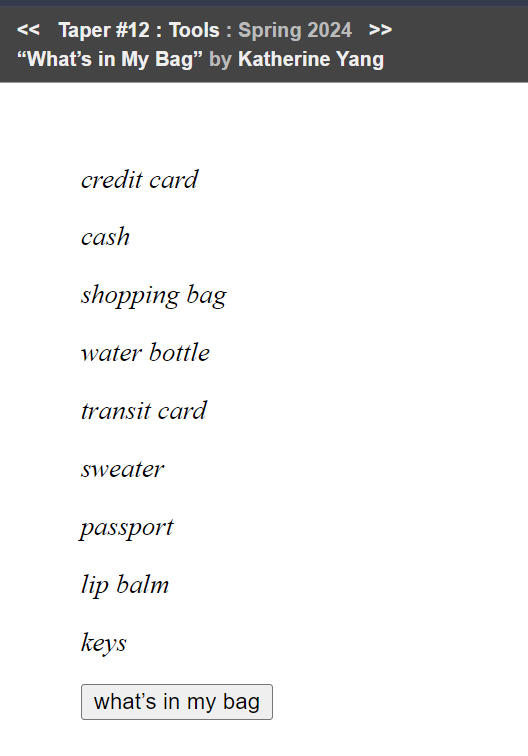
o[n - 1] refers to the last array in the o array (which was generated earlier in the code). Then, you are searching for an element in that array where the value is equal to t.length - 1.
Once found, the index of this element is assigned to the variable z.
o[n - 1].splice(z, 1) removes the element that was matched in the previous line.
o[n - 1].push(t.length - 1) After removing the element, this line adds the t.length-1 back to the end of the same array.
d = document declares the document object as the variable, d.
b = d[q="querySelector"]("#b") has b assigned to the result of querying the DOM for an element with the ID "b". It also declares the querySelector tag to the q variable.
l = d[q]("#l") has l being assigned to the result of querying the DOM for an element with the ID "l"
r = h = 0 initializes variables, r and h, to 0.
Display Logic
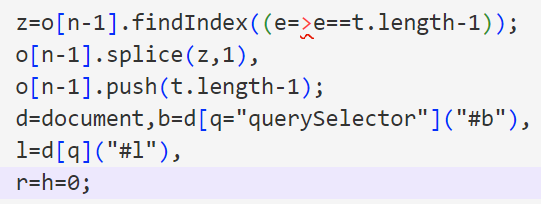
First off, l.onclick=()=> sets up event handling for a click action.
Next, there is an if-else loop implemented. For the if-condition, I assume that it checks whether r (the current round) is non-zero.
e = o[r][h] retrieves an index, e, from the current round in o.
a = b.querySelectorAll("p")[e] gets the corresponding paragraph element from the HTML with the same index
i = t[e][r] assigns t[e][r] to i, which holds the actual description text.
a.innerHTML+=`—${i}` has the description appened to the inner HTML of the selected paragraph element with an added dash and italic tags.
h++ increments the index h
h==t.length&&(r++,h=0,r==o.length&&(l.remove())) ultimately removes the click event listener once all rounds are completed
In the else block,
b.innerHTML+=`${t[h][r]}
` will append a new paragraph with the first description from t.
h++ increments the index h.
h == t.length&&(r++, h = 0) says that if all descriptions are displayed, it moves onto the next round.
Based on all this, I believe that the if-block executes once all the items and it starts attaching descriptions to the items whereas the else-block executes first. This is based on the fact that the button (l) is removed towards the end of the if-block and after you click the button and all descriptions are appended to their items.